Cron is a special software utility built into the Linux operating system that lets you run files, scripts and other actions at a desired interval.
For example, our own website needs the parse.php file to run every two hours to fetch fresh currency rates from google finance. Someone else may need to make backups at a set interval, archive data, and so on. There can be many tasks for cron.
How to correctly set up Cron jobs
Setting up a cron job is easy if your server comes with a control panel installed. Otherwise, open the cron file and add an entry there.
To edit the crontab file, enter a special command in the command line or open the file in a text editor:
# crontab -e
If you have the ISPManager control panel installed, log in as the required user, then go to "Main" - "Scheduler" and add a rule there.
All lines in the crontab file have the form:
minute hour day month day_of_week command
* - means "every"
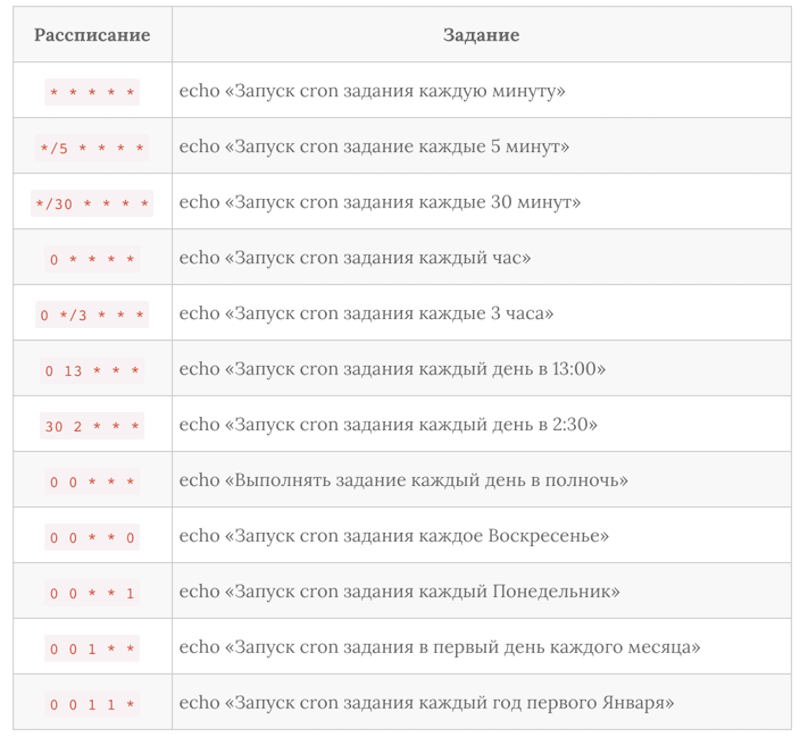
And now here are some examples of what cron commands may look like:
*/5 * * * * cd /var/www/master-server.pro/mypanel/;/usr/bin/php cron.php >/dev/null 2>&1
0 */1 * * * cd /var/www/master-server.pro/backup/;/usr/bin/php mybackup.php >/dev/null 2>&1
Where the Cron file is located on the server
This file is usually located at /var/spool/cron/crontabs