A full move of a website to a new domain may be needed when a company changes its name, picks a catchier address, or for a number of other reasons.
The top priority when moving is to keep your rankings and avoid losing traffic and page authority.
Three steps to correctly move a website to a new domain
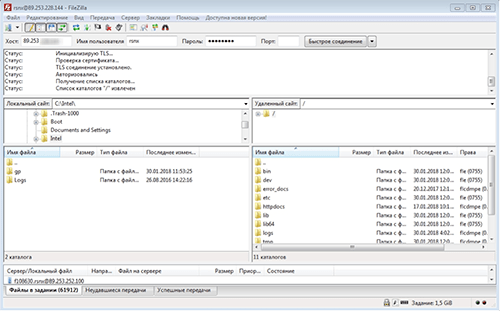
STEP 1: First of all, you need to transfer all files from the old server to the new one. This can be done via an SSH console or with the free FileZilla application, Winscp, or any other FTP client. If the domain change happens within the same hosting provider, it is worth notifying them about the upcoming procedure; you may also need help from a Linux server administrator.
The database also needs to be downloaded, keeping the latest changes in mind. You can do this by downloading a dump of the database itself or via PhpMyAdmin, where exporting it to your local computer is straightforward.
The downloaded .sql database file, which contains all the records, should be opened in a text editor (for example NotePad++), and using the keyboard shortcut (Ctrl+H) you can replace the old URL with the new one.
Next, for the site to work correctly and connect to the database properly, you need to find the configuration file config.php or similar and enter the new database connection parameters there: DB_Name, DB_User, DB_Password, DB_Host.
STEP 2: The 301 redirect is the most important part of the job: it lets you correctly redirect all traffic to the new domain without losing page authority, traffic or search engine rankings.
The redirect can be set up in the .htaccess configuration file, which should be located in the root folder of the old domain. Inside it, add the following piece of code:
Options +FollowSymLinks
RewriteEngine on
RewriteCond %{REQUEST_FILENAME} !googleab44945hb4565415b.html
RewriteRule (.*) https://new-domain.com/$1 [R=301,L]
Where,
RewriteCond %{REQUEST_FILENAME} !googleab44945hb4565415b.html - the Google file confirming domain ownership
RewriteRule (.*) https://new-domain.com/$1 [R=301,L] - the address of the new site
If some pages will be removed on the new domain, the redirect for them should point to the home page. The 301 redirect should be checked thoroughly, without overlooking tricky links to videos, images and other files. To fully restore your old metrics, do not stop paying for the hosting with the old domain, otherwise the redirect to the new site will become unavailable to users.
For faster indexing of the new pages, specify the new Host value in robots.txt:
User-agent: *
Disallow:
Host: new-domain.com
STEP 3: By following the requirements of the Google and Yandex search services when changing a domain, you will keep their goodwill and avoid losing their trust metrics.
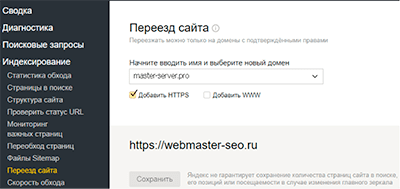
Yandex Webmaster requires you to verify ownership of both domains, after which, in the site move section, you specify the new address, including the https and www prefixes in how the address is displayed. Later you will need to re-check all utm tags so statistics collection can continue.
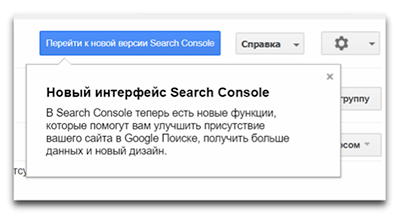
Google in turn requires similar actions: add the new site's address with a full crawl, submit a Sitemap xml file, and the Google Webmaster panel will guide you through the next steps in the Search Console section.